loopleSheet#
The purpose of this library is to provide a subroutine wrapper connected to a Google Sheet. It implements the main loop (calling the subroutine in a loop) and interacts with a Google Sheet.
This library allows the rapid deployment of a robot and offers a tracking of it. This can be relevant for example in the context of Raspeberry Pi boards.
A full documentation is available here.
Features:
sleep time between 2 executions of the subroutine is read from the Google Sheet
display the date and time of the last execution of the subroutine in the Google Sheet
allow to post messages in the Google Sheet. These messages are automatically time-stamped
In order to use this library, you need to have a Google account and you need to accept the Terms of use of Google Cloud Platform.
Installing#
You can install this library using:
pip install loopleSheet
or:
python3 -m pip install loopleSheet
Useful Information#
In order to work with a Google Sheet, loopleSheet need 2 elements:
the
keyof the Google Sheet (a.k.a Spreadsheet ID)a
.jsonfile with access credentials
Getting a Spreadsheet ID#
You can get the Spredsheet ID of a Google Sheet from the url used when you edit the Google Sheet online. It is the part between https://docs.google.com/spreadsheets/d/ and /edit#gid=0.
For example, in the url https://docs.google.com/spreadsheets/d/1LzDqgfWea1cIafGnXhIc2OEFCHzoFOSdO1qsSlK3rGk/edit#gid=0, the Spreadsheet ID is 1LzDqgfWea1cIafGnXhIc2OEFCHzoFOSdO1qsSlK3rGk.
Creating access credentials#
This library uses Google Service account credentials. You can follow this documentation for creating a Project and a Service account. Don’t forget to select Google Sheet API when you are asked which API you want to use.
At the end of the process, you should have downloaded the .json file.
Google Sheet template#
Your Google Sheet is not processed by loopleSheet, so don’t expect some clever behaviour.
I suggest your Google Sheet to be like this one :
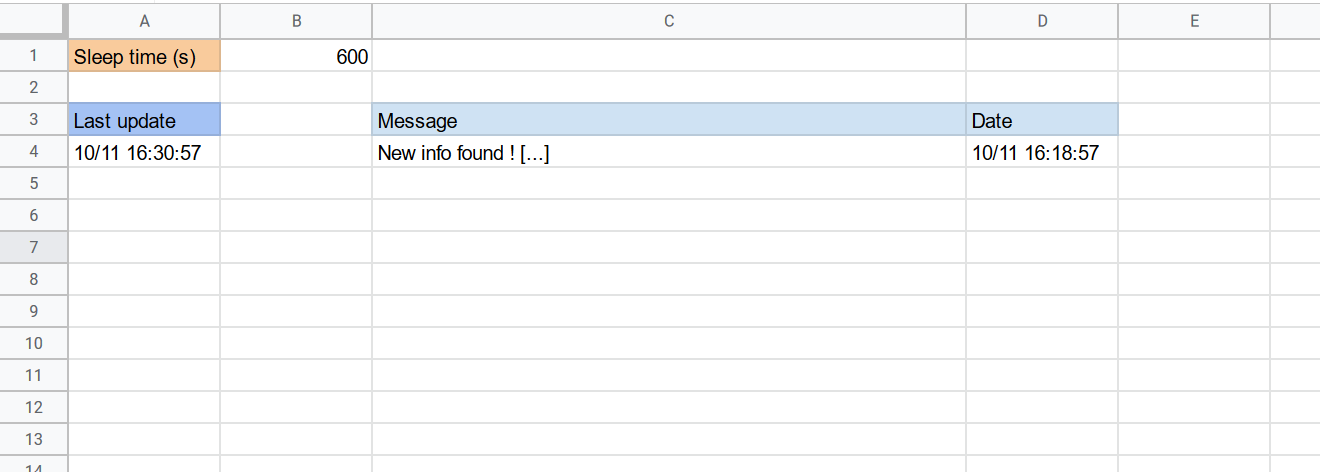
By default, loopleSheet:
expects in the
B1cell the number of seconds to sleep between 2 executionswill write the date and time of the last performed execution in the
A4cellwill write the messages you want to post in the
Ccolumn with the associated date and time in theDcolumnworks on the
firstsheet of the Google Sheet
You can edit this behavior.
Examples#
import os
import sys
import loopleSheet as ls

def subroutine(loopleSht):
	# Doing some work...

	if special_result:
		loopleSht.post('New info found ! [...]')


# The .json is next to the script
ls.LoopleSheet(json_path=os.path.dirname(os.path.realpath(sys.argv[0]))+'/credentials.json',
spreadsheet_id='1LzDqgfWea1cIafGnXhIc2OEFCHzoFOSdO1qsSlK3rGk',
runnable=subroutine,
catchingExceptionsFromRunnable=True).start()
Note: You may have to kill the script in order to finish it